Out of a quiet obsession, we built a beast. 60+ heavy utilities, handed freely to the web.

A few months ago, Launch Your Concept released a beast. 60+ massive utilities operating entirely off the grid.. Inside the engineering madness that built FlashTools.
We were tired of the web feeling like a tollbooth. Every basic utility — compressing a PDF, stripping a background, or converting a video — demanded an upload, a forced login, or a hidden subscription. So, we stopped complaining and went to work. What started as a small internal experiment became a quiet obsession to push the browser to its absolute breaking point. No cloud queues, no data harvesting. Just WebAssembly, local AI, and pure client-side compute.

Here is how we engineered the ultimate browser-native utility belt, and why we handed it freely to the open web.
The Architecture: Flipping the Compute Model
The "free online tools" ecosystem is broken. You upload a sensitive PDF to a server, wait in a queue, and hope your file isn't sitting on an S3 bucket with a misconfigured ACL.
The engineering response isn’t necessarily new—browser APIs have been capable of local file processing for years. But assembling 60 of them into a unified, production-grade platform required rethinking the standard web architecture.

We don't mean a thin UI shell that ships your file to a Lambda function. We mean FFmpeg compiled to WebAssembly. We mean ONNX neural networks executing on your GPU.
Here is what the system actually looks like:
The frontend is a Vite-bundled React 19 SPA. The backend is a deliberately lean Express 5 server. Its only jobs are extracting video streams, relaying WebRTC signaling, and hosting a MongoDB collection for 24-hour code shares. Everything computationally heavy happens on the client.
The AI Tier: Local ML, Zero API Keys
Five of our six AI tools run entirely on-device. No API key, no cloud inference endpoint, and no data leaving your machine.
- Background Removal: Uses RMBG-1.4, a BiRefNet-architecture model compiled to ONNX, served via @imgly/background-removal. The model downloads once to your browser, then runs local inference for transparent PNG output or solid color replacement.
- Face Blurring: Runs the Xenova/detr-resnet-50 object detection model locally via Hugging Face Transformers.js. It detects people, calculates the bounding box for the face region, and applies a multi-pass canvas blur.
- Audio Transcription: Powered by Whisper.js (OpenAI's Whisper compiled to ONNX) for file-based transcription of MP3/WAV, all handled inside the tab.
The stack behind this is ONNX Runtime Web and Transformers.js. The entire inference pipeline—model download, execution, and result rendering—happens using your own device's compute.
The Video Engine: Singleton FFmpeg in the Browser
Running video processing in the browser is notoriously heavy. FlashTools runs FFmpeg.wasm—a WebAssembly build of the full FFmpeg binary—inside the tab.

The Engineering Catch: Initialization overhead. Loading FFmpeg into memory takes time. If we initialized it every time a user switched from the Video Trimmer to the Audio Extractor, the UX would be sluggish.
The Solution: The FFmpeg instance is engineered as a singleton. It is loaded exactly once per session and shared across all 15+ video and audio tools. A global ProcessingBanner component tracks background job statuses across React route navigations, allowing you to compress a video in the background while generating a QR code in another view.
The Video Downloader: Engineering Zero-Bandwidth & Bypassing Bot Detection
Supporting 1000+ sites (YouTube, Twitter, TikTok) without bankrupting our server bandwidth costs required a highly specific flow:
- User pastes URL → Server runs yt-dlp --dump-json
- Server parses JSON → Extracts the direct CDN URLs
- Browser receives JSON → Browser downloads directly from the CDN via
<a download>.
The server proxies zero bytes for the vast majority of requests.
Solving the YouTube PO Token Memory Leak
YouTube now requires a "Proof of Origin" (PO) token from datacenter IPs to block bots. Generating this token requires running ~2.4 MB of YouTube's JS inside jsdom.
Doing this inside a standard Node.js process balloons the V8 heap memory to 1.5–2 GB. On a shared backend, this is a guaranteed Out-Of-Memory (OOM) crash.
Our Architecture Fix: We isolated the memory explosion using a dedicated child process.
By spawning the process with --max-old-space-size=512, generating the token, and immediately killing the process, the main server stays perfectly lean. Tokens are cached, so the user never feels the cold start.
The Cobalt Fallback Pool
When datacenter IPs are blocked, we fall back to a dynamic pool of community Cobalt API instances. Instead of firing requests in parallel (which would incorrectly select the fastest broken instance returning a 0-byte 200 OK), we implemented sequential probing.
Each candidate receives a Range request for bytes 0–4095. If it successfully serves the video bytes, it wins.

PageSnap: Intercepting XHR Before Angular Bootstraps
PageSnap turns AI conversations (ChatGPT, Claude, Gemini) and Twitter threads into clean, editable Markdown/PDF documents.
Because these platforms are complex React/Angular SPAs, there is no static HTML to scrape. Our browser extension service worker uses highly targeted extraction paths:
- ChatGPT/Claude: Opens a hidden tab, waits for React hydration, and parses the DOM.
- Google Gemini: Gemini delivers conversation data through a batchexecute API endpoint using a custom, obfuscated wire format. To capture this, our background worker injects an XHR hook at document_start—before Angular even bootstraps—to intercept and decode the raw API response natively.
- Twitter/X: Relies on an api.fxtwitter.com proxy, bypassing the need for headless browser scraping entirely.
P2P File Drop: WebRTC With No Storage Server

How do you transfer an 8GB file securely between two devices without paying for S3 storage? You don't store it.
We used WebRTC DataChannels for direct browser-to-browser transfer, using Socket.io strictly for signaling. Files are chunked into 64KB pieces and transferred peer-to-peer.
State Management: IndexedDB over React State
For multi-file tools like "Merge PDF", holding 50MB of PDFs in React state is dangerous. A simple accidental page refresh wipes out the user's entire session.
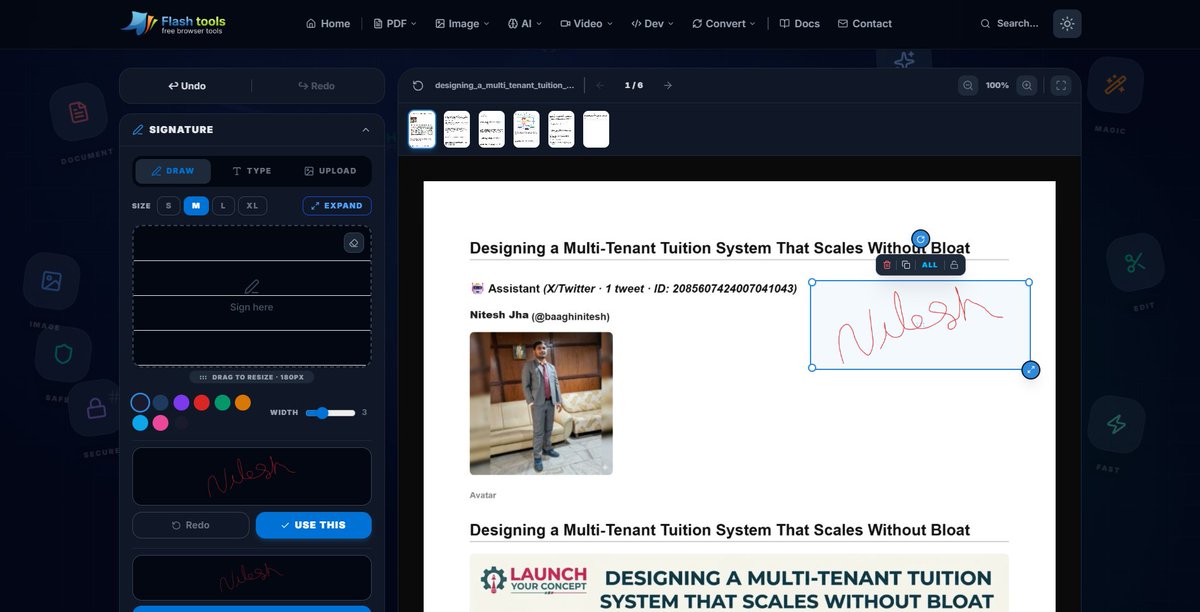
Instead, we treat the browser like a true local filesystem. Files are serialized as Uint8Array and persisted into IndexedDB using a custom fileDB wrapper. This handles sorted lists, upserts, and deletions natively. If a user accidentally closes the tab, they can reopen it and their PDF merging session is exactly where they left it.
The Tech Stack Matrix
Building 60 cohesive tools required strict discipline in the dependency tree. Here is what is actually running under the hood:
Why Build This?
We built this because browser compute is genuinely powerful enough to handle production-grade workloads. WebAssembly, ONNX Runtime, and the Web Crypto API have crossed a threshold: "local-first" is no longer a compromise; it is an outright upgrade.
The privacy argument of FlashTools isn't marketing fluff—it is a structural property of the codebase. When there is no upload endpoint, there is no data to breach. When inference runs on your local GPU, there is no API payload to intercept.
60 tools don't have to be 60 fragmented apps. With a unified service registry and a shared component architecture, the browser can be the ultimate, secure operating system for your daily utilities.
The obsession isn't done yet.
(Built by Launch Your Concept. Platform live at flash.launchyourconcept.com)

Have thoughts or questions on this topic?
Follow and discuss with our engineering team on X / Twitter for daily tech breakdowns, system design notes, and software engineering debates.
Related Articles

Your Phone Was Always a Better Remote Control . NEXORA Just Made It Feel Like One
I never noticed how frequently I reached for the mouse until I began keeping count. Lean in, click, lean back, open a tab, skip a track, type six words—and repeat the loop dozens of times an hour. The
Beyond the Hype: Building AI Agents That Actually Work in Production
We’ve all seen the magical AI demos. You type a vague prompt into a chat box, and a few seconds later, an "autonomous agent" writes a marketing plan, codes a website, and emails a client. It looks

Designing a Multi-Tenant Tuition System That Scales Without Bloat
How a client who refused to touch a payment gateway forced a leaner, faster architecture than any "best practices" checklist would have produced. My client didn't know what a server was. He'd never