Your Phone Was Always a Better Remote Control . NEXORA Just Made It Feel Like One


I never noticed how frequently I reached for the mouse until I began keeping count. Lean in, click, lean back, open a tab, skip a track, type six words—and repeat the loop dozens of times an hour. The whole time, a smartphone was resting right next to my hand, doing nothing useful except lighting up whenever a notification arrived.
It's not "remote desktop." It's not another clunky trackpad utility from 2016 that drops connection after three meters. It is the simple, somewhat absurd truth that the most capable pointing and touch device you own has been sitting in your pocket, while you continue buying dedicated mice that require a clean flat surface, constant battery charges, and a reason for being on your desk.

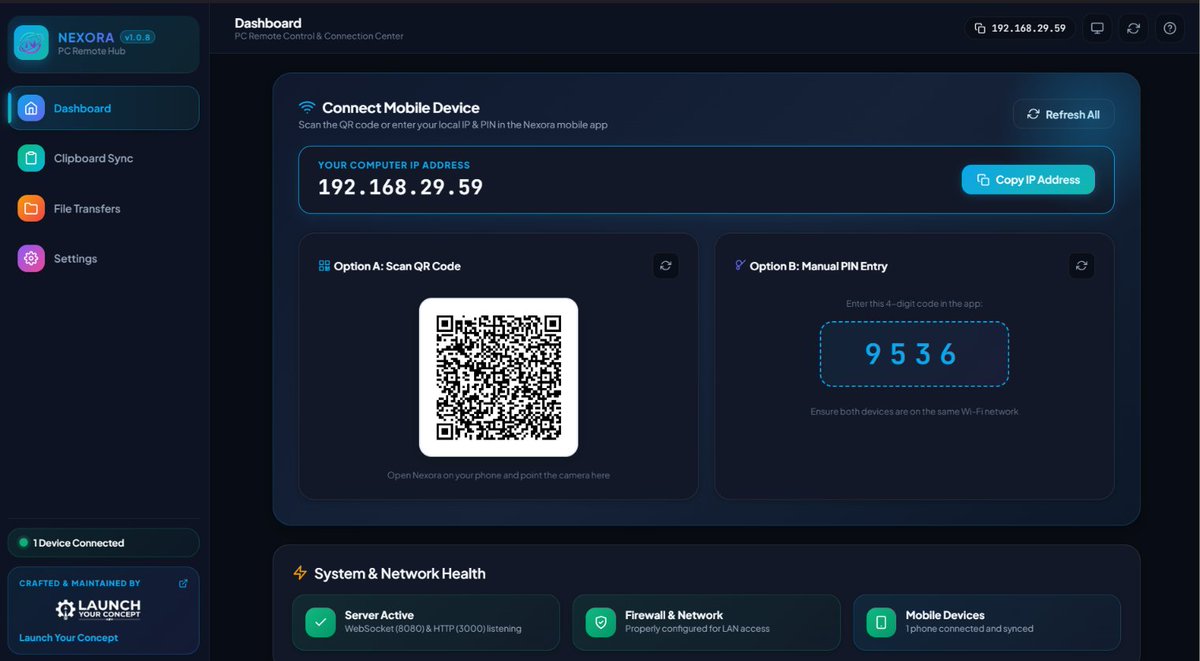
While most wireless peripherals tether you to the immediate desk space, Nexora takes a completely different route. Your Android phone and a lightweight Windows companion app discover each other instantly across your local Wi-Fi or mobile hotspot. You scan a pairing QR code, and in seconds, your phone transforms into a true wireless remote control hub: an ultra-responsive trackpad, a bi-directional clipboard bridge, an instant app launcher, a transparent pen tablet that draws live over your PC screen, and a purpose-built 11-row mechanical keyboard with seamless speech-to-text dictation.
Other remote control apps exist, but most suffer from two major flaws: their best capabilities are hidden behind expensive subscriptions or aggressive paywalls, and their input pipelines are plagued by noticeable cursor lag.
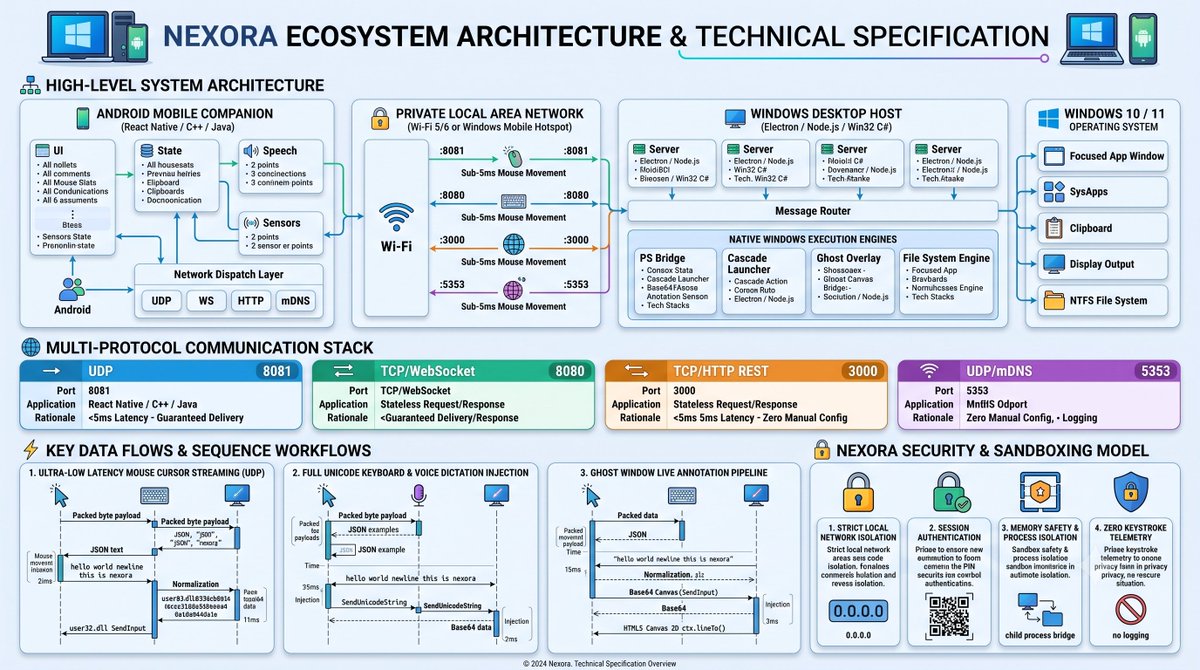
Nexora was built from day one as a performance engineering challenge. It is 100% free, runs without third-party servers or accounts, and operates entirely over your private local network with sub-5ms input latency. Beyond standard pointing and clicking, the system is packed with architectural surprises designed to make a phone feel like a native desktop peripheral.
Below is the complete architectural roadmap of how it was built, what broke under real-world testing, and the non-obvious engineering solutions that made it work.


Technical Breakdown: Topic Outline & Roadmap
We will unpack and deep-dive into each of these topics one by one. Here is the architectural blueprint:
1. The Latency Trap & The Three-Channel Transport Architecture
- Most remote mouse applications rely entirely on a single TCP connection (like WebSockets) for all data transfer. While TCP is excellent for reliability, it introduces a critical flaw for real-time input: head-of-line blocking. If standard Wi-Fi interference causes a single packet to drop, TCP halts the entire stream to wait for a retransmission. For a cursor moving at 60 events per second, this causes a backlog that flushes all at once, resulting in a frustrating, jumpy cursor on your screen.
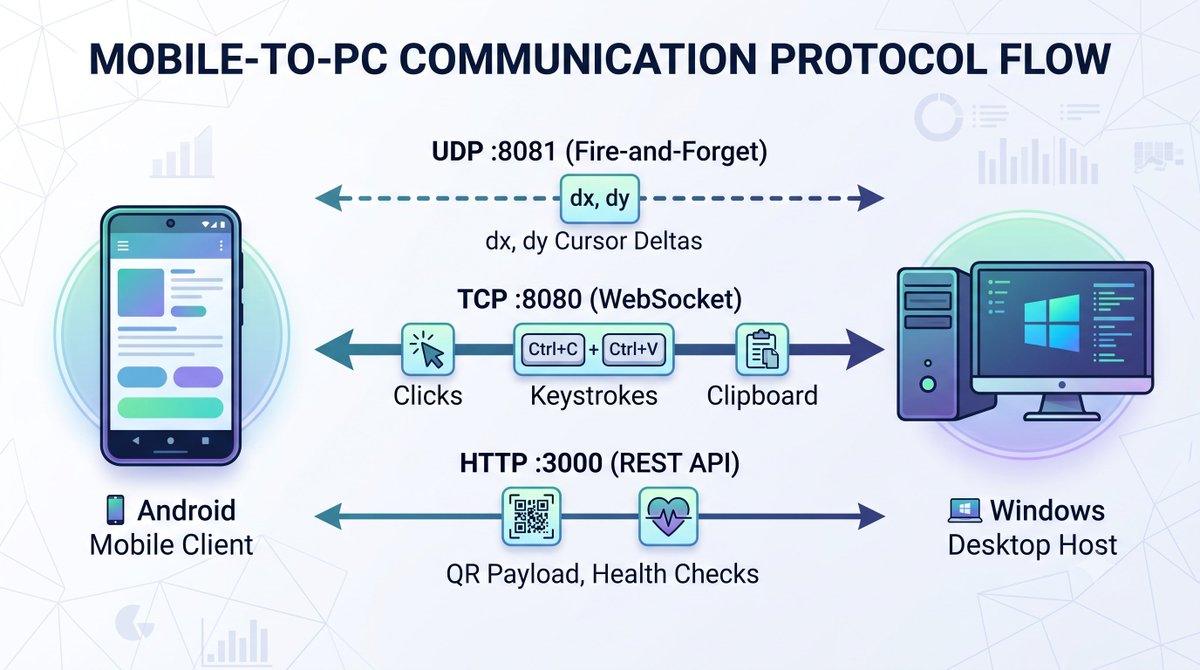
- To solve this, Nexora abandons the single-channel approach in favor of a highly specialized Tri-Protocol Stack. By routing data through the protocol best suited for its specific physical characteristics, we achieve sub-5ms latency.
The Tri-Protocol Architecture
Note: While currently operating flawlessly over Wi-Fi and mobile hotspots with ultra-low latency, we are also actively integrating experimental Bluetooth (BLE) support via Noble for completely router-free connectivity in future updates.
The Data Flow Architecture:
2. Kernel-Level Input Execution on Windows
Getting a network packet to your PC quickly is useless if the operating system takes too long to execute it. Early alpha versions of Nexora received a network command and spawned a quick background process (exec('powershell -Command...')) to move the mouse or press a key. The problem? Windows process creation takes between 100 and 300 milliseconds. If you spawn a process for every keypress or cursor micro-movement, the CPU spikes, and the system becomes completely unusable.
The Persistent Win32 C# Engine
To bypass OS boot times, Nexora’s desktop server launches a single, persistent PowerShell process at startup and keeps it alive forever. This process dynamically compiles a C# class exposing direct Win32 API bindings like SetCursorPos, mouse_event, and SendInput.
The Node.js server communicates with this engine strictly by writing single-line strings directly to the process's standard input (stdin) pipe. For example:
VK|<hexVK>|<modMask>|<up>triggers a virtual keypress.CHAR|<codepoint>injects universal Unicode characters natively.
This architectural pivot dropped per-key execution latency from ~300ms down to under 5ms.
The Silent MOVE Pipeline
At 120 frames per second, piping cursor data into a background process creates a new bottleneck: the stdout buffer. Initially, the persistent C# engine printed "OK" back to Node.js for every movement command. At high frequencies, this instantly filled the pipe buffer, stalling the entire process and freezing the mouse.
The fix was the Silent MOVE Pipeline:
- Fire-and-Forget Execution: Movement (MOVE), click (CLICK), and scroll (SCROLL) commands were stripped of all Write-Host responses. The buffer stays completely empty, ensuring Node.js never blocks while waiting to read.
- 120fps Recursive Batching: Instead of flooding the Win32 API with every UDP datagram, the server batches pending translation deltas and flushes them using a recursive setTimeout loop every 8 milliseconds.
This precise combination of persistent inter-process communication (IPC) and silent batching is what makes Nexora physically indistinguishable from a hardware wireless mouse.
3. Native Multi-Touch Gestures Without the Jitter
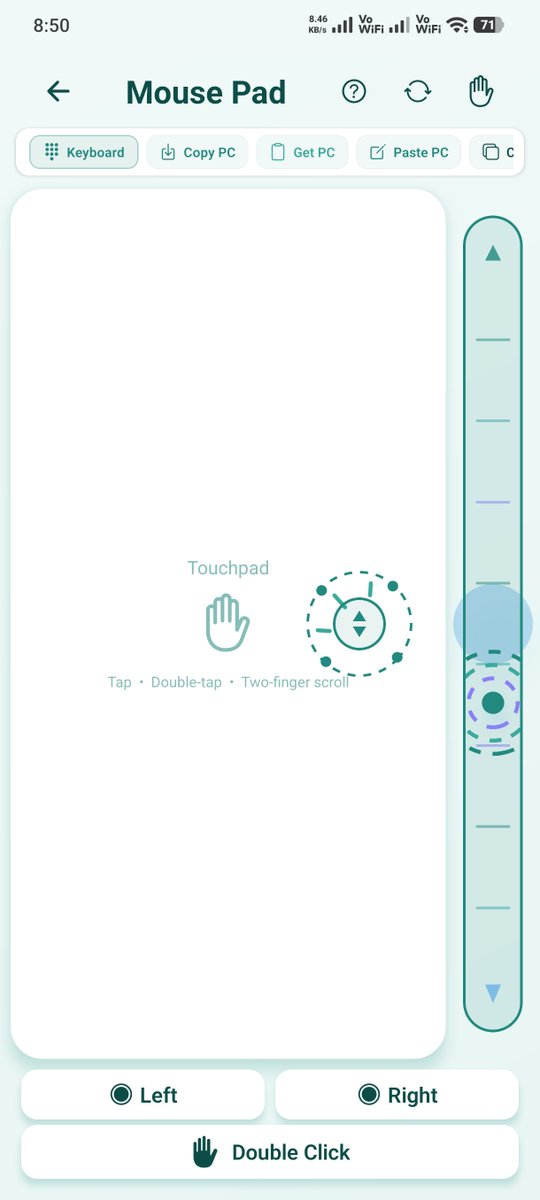
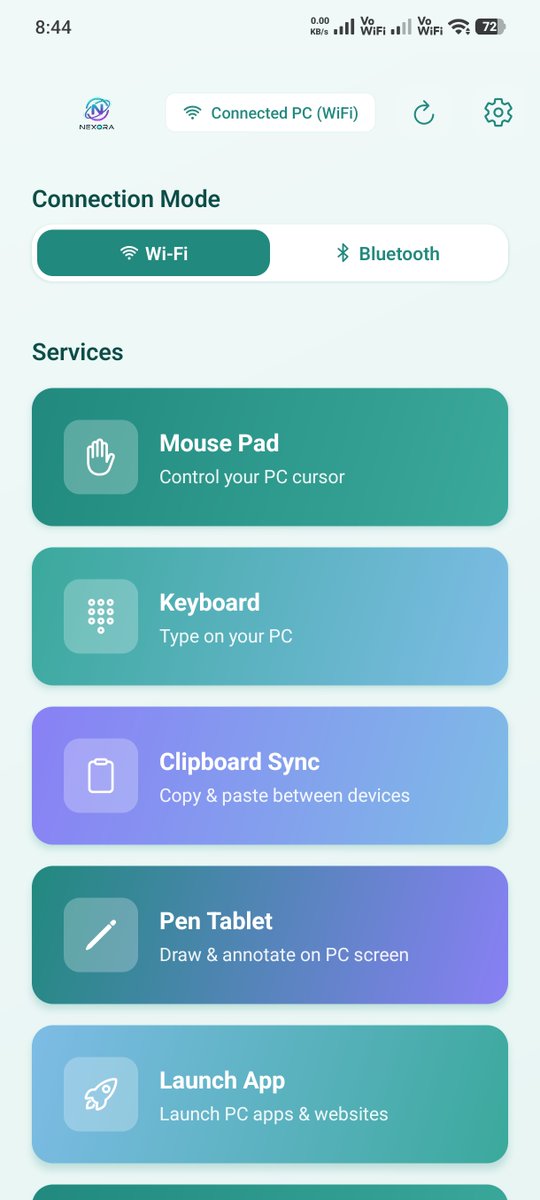
Building a mobile trackpad inside a hybrid framework like React Native initially led to severe usability issues when relying on the default PanResponder API.
The PanResponder Breakdown
PanResponder tracks cumulative displacement (dx, dy) across a single touch identifier. When a second finger lands on the screen for a two-finger scroll, Android dispatches an underlying touch-grant event. This resets the internal delta tracking to zero, injecting an erratic coordinate spike into the stream and making the desktop viewport violently jump. Additionally, PanResponder requires initial movement to claim gesture ownership, causing micro-taps to be silently dropped.
The RNGH Architectural Overhaul
Nexora completely replaced PanResponder with react-native-gesture-handler (RNGH), running gesture recognition directly on Android's native UI thread rather than across the JavaScript bridge:

4. Desktop Typing Re-Engineered for a 6-Inch Screen
Standard mobile keyboards shrink keys into unusable dimensions when mapping desktop layouts. Nexora solves this by re-orienting space: stacking horizontally scrollable functional strips on top of a full mechanical layout.


The 11-Row Mechanical Layout mapping over 100 desktop keys into distinct, scrollable touch zones.
Bypassing Keyboard Layouts via KEYEVENTF_UNICODE
Standard remote input maps characters using Win32 VkKeyScan(), which fails (returns -1) on accented characters, non-Latin scripts, and emojis.
Nexora bypasses the active Windows keyboard layout entirely. When printable text arrives, the server pipes CHAR|<codepoint> to the persistent Win32 engine. The engine uses SendInput with the KEYEVENTF_UNICODE flag:
Every character, accented glyph, and emoji injects natively into any focused Windows application.
Single-Thumb Modifier Latching
Key combinations like Ctrl+Shift+T are impossible on touchscreens using physical hold semantics. Nexora introduces Stateful Latching: tapping Shift, Ctrl, Alt, or Win locks the modifier into an active, glowing state. The mobile app includes active modifier bitmasks in subsequent keystroke packets, and the Windows bridge holds the virtual modifier down until the companion key triggers.
Real-Time Voice Dictation Pipeline
Nexora integrates Android's native SpeechRecognizer with an in-line syntax normalizer. Spoken natural language is transformed into syntax and punctuation tokens in real time before transmission:

In Auto Mode, words and backspaces stream live into the focused PC application; Buffer Mode holds multiline compositions locally until you review and tap Send.
5. The "Ghost Window": Transparent Live Desktop Annotation
Most remote drawing utilities capture a screenshot on the PC, stream the image back to the mobile phone, and require the user to draw on a static image. Nexora replaces this paradigm with the Ghost Window: an always-on-top, transparent drawing overlay rendered natively on the desktop display, allowing seamless annotation over live presentations, code editors, or full-screen video without stealing user focus.
The Electron Ghost Window Architecture
Rendering an interactive canvas over the Windows desktop without disrupting normal mouse interaction requires a specialized set of Electron window flags:
- type: 'toolbar' and focusable: false: Prevents Windows from switching focus away from active presentations, IDEs, or games when an annotation begins.
- alwaysOnTop: true (with 'screen-saver' tier): Keeps the transparent canvas pinned above full-screen slideshows and browsers.
- setIgnoreMouseEvents(true, { forward: true }): Forwards physical mouse clicks directly through the HTML5 canvas to underlying desktop applications, allowing users to interact with desktop apps while annotations remain visible.


The 16-Byte Binary Protocol
A continuous stylus stroke generates 60–120 touch events per second. Serializing each point as a JSON string ({"type":"draw","x":0.52,"y":0.31}) floods the V8 engine with memory allocations, triggering frequent garbage collection pauses.
Nexora eliminates this overhead by packing every stroke event into a compact 16-byte Float32Array:
The Node.js server identifies 16-byte binary frames and immediately routes them to the Electron overlay via WebSockets without decoding the payload, resulting in zero server-side JSON parsing overhead.
Algorithmic Smoothing & Shape Snapping
Raw touch coordinates naturally exhibit micro-jitter. Nexora applies midpoint quadratic Bézier interpolation across incoming points, generating organic, smooth curves. Upon receiving command: 3 (StrokeEnd), the system runs the Ramer-Douglas-Peucker (RDP) polygon simplification algorithm: if the stroke forms a closed loop with low radial deviation, it automatically snaps into a geometric circle or rounded rectangle.
6. High-Speed File Streaming & Scoped Storage
Local file sharing frequently suffers from poor throughput, complex network setups, or intrusive permission requests. Nexora transfers files at 40+ MB/s across local Wi-Fi without requiring intrusive storage privileges on Android.

Android Scoped Storage via SAF
Traditional Android apps demand the broad READ_EXTERNAL_STORAGE permission, which triggers privacy warnings and exposes the entire file system. Nexora utilizes the Android Storage Access Framework (SAF). When a transfer begins, Android's system file picker provides a temporary, scoped content URI restricted exclusively to the selected document or media file. Once the transfer pipeline finishes reading the stream, access automatically lapses.
Pipelining: The 256KB Chunk Sweet Spot
Network throughput and bridge memory in hybrid mobile apps depend heavily on chunk size:
- Large Chunks (>2MB): Quickly saturate React Native's memory buffers, triggering Out-Of-Memory (OOM) crashes on devices with restricted RAM limits.
- Small Chunks (<32KB): The overhead of TCP frame headers, buffer allocations, and acknowledgment tracking throttles transfer rates.
Through iterative testing, 256KB proved to be the optimal frame size. Nexora dispatches chunks using 6 concurrent in-flight streams, saturating local 5GHz Wi-Fi bandwidth without blocking the React Native JavaScript thread.
Out-of-Order Assembly & SHA-256 Validation
On the Windows desktop side, chunks are written to disk using non-blocking file descriptor calls:
Because writes target an explicit byteOffset, incoming packets can arrive out of order across concurrent streams without corrupting file structure. As chunks land, a continuous SHA-256 stream updates in the background; once the final byte commits, the client and server hashes are matched to verify bit-perfect integrity.
7. Instant Zero-Config Network Discovery & Local Security
Connecting a mobile peripheral to a PC usually frustrates users with manual IP lookups or broken network scans. Nexora eliminates manual configuration by pairing multi-adapter discovery heuristics with an architecture designed around strict local privacy.
The Subnet Classification Engine
Standard Wi-Fi scans examine all 254 addresses in a subnet sequentially, which can take several seconds to complete. Nexora’s discovery utility (networkUtils.ts) inspects the mobile device’s local IP address and immediately classifies the network topology into targeted profiles:
When scanning standard Wi-Fi, the client issues lightweight HTTP GET http://<ip>:3000/health requests with a 1-second timeout per batch to locate the host server.

mDNS Fallback & Dynamic QR Pairing
If router firewall rules block ICMP or broadcast sweeps, the desktop server advertises its connection profiles using mDNS/Bonjour (_nexora._tcp.local) on port 5353.
Simultaneously, the desktop dashboard generates a dynamic SVG/Base64 QR code encoding every active network adapter IP alongside a randomized 4-digit PIN. Scanning this code pairs the devices immediately and validates the session token, rejecting unauthorized network probes.
Architecture-Level Local Privacy
Nexora enforces security at the protocol and OS level rather than relying on an external policy:
- Zero External Outbound Connections: The Node.js server binds strictly to 0.0.0.0 to accept local traffic across designated ports (8080, 8081, 3000) with zero cloud relays, external analytics, or remote telemetry.
- OS-Enforced RFC 1918 Boundaries: The mobile client's Android Network Security Configuration explicitly restricts cleartext HTTP and WebSocket traffic to private local ranges (192.168.0.0/16, 10.0.0.0/8, 172.16.0.0/12). Even under DNS redirection or routing manipulation, the operating system blocks traffic from traveling across the public internet.
8. The 3-Tier App & System Launcher
The App Launcher lets you trigger desktop software, media services, and Windows system configuration menus from your phone with a single tap. Launching native desktop applications across diverse environments (packaged Electron builds versus standalone background servers) requires a resilient execution pipeline.
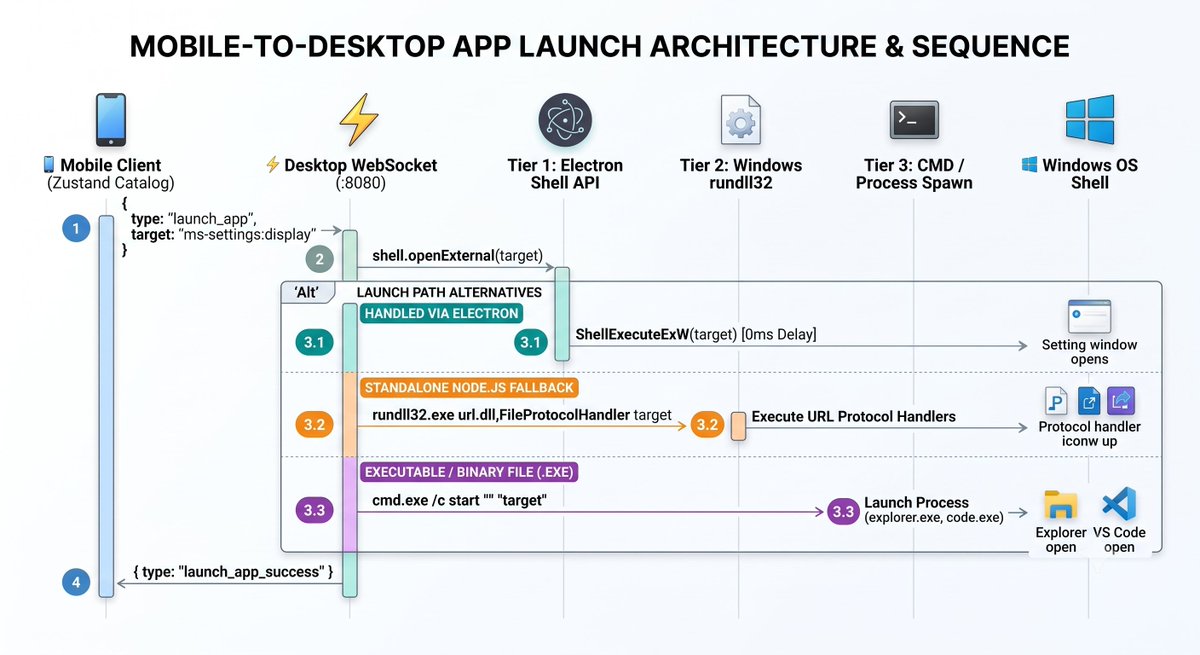
The Unified Execution Cascade
Nexora implements a 3-tier fallback engine to ensure commands execute cleanly without hung threads or stray command prompt windows:
- Tier 1 (Direct Electron Shell API): Calls shell.openExternal(target) for web URLs (https://...) and registered system URI schemes (ms-settings:display, calc:, spotify:, discord:). Local directory paths use shell.openPath(target). This routes directly through Windows ShellExecuteExW APIs with zero process creation overhead.
- Tier 2 (Windows rundll32.exe url.dll,FileProtocolHandler): If running outside an Electron shell wrapper, requests fall back to Windows' native protocol handler. This dispatches browser sessions and system URLs without opening terminal windows or failing on quotation characters.
- Tier 3 (Windows cmd.exe /c start & Native Process Spawning): Used for launching binaries and administrative scripts (taskmgr.exe, explorer.exe, custom developer tools like code.exe) directly into the active user session.
Quick Launch Synchronization
The Launcher features 50+ pre-configured targets alongside user-defined .exe paths and URI schemes.


Through a synchronized Zustand store, any target marked as a Starred Favorite in the Launcher tab updates the Quick Launch macro strip positioned directly above Row 1 of the mechanical keyboard. This lets you jump between terminal commands, launch development environments, and switch applications without leaving the typing view.
What I Learned
Building Nexora forced me into a class of problems that standard web development rarely touches: the boundary between a managed runtime and the operating system kernel.
The latency problem was not solvable by writing better JavaScript; it required hacking a persistent C# process to bypass OS boot times. The gesture system required abandoning React Native's default tools to tap into native Android threads.
Your phone has packed the processing power, the touch sensors, and the network hardware to be the ultimate peripheral for half a decade. It was just waiting for the right software to unlock it.
Your phone has packed the processing power, the touch sensors, and the network hardware to be the ultimate peripheral for half a decade. It was just waiting for the right software to unlock it.
Try It
Nexora is available now, completely free, with no subscriptions or feature limits:
- Android: Download the mobile app directly from the Google Play Store or grab the APK from GitHub Releases.
- Windows: Get the Desktop Server from the Microsoft Store or download the installer via GitHub Releases.
- Learn More & Documentation: Visit the GitHub Repository for the full setup guide, source code links, and release notes.
Built with love by Launch Your Concept — a software studio focused on building practical tools that respect user privacy.
Try it out. You might never buy a travel mouse again.

Have thoughts or questions on this topic?
Follow and discuss with our engineering team on X / Twitter for daily tech breakdowns, system design notes, and software engineering debates.
Related Articles
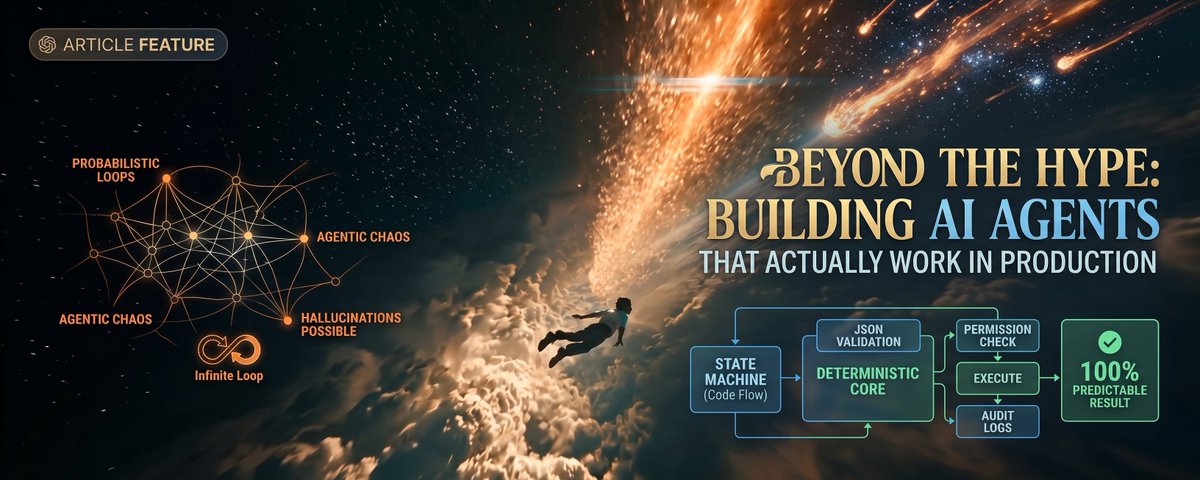
Beyond the Hype: Building AI Agents That Actually Work in Production
We’ve all seen the magical AI demos. You type a vague prompt into a chat box, and a few seconds later, an "autonomous agent" writes a marketing plan, codes a website, and emails a client. It looks
Out of a quiet obsession, we built a beast. 60+ heavy utilities, handed freely to the web.
A few months ago, Launch Your Concept released a beast. 60+ massive utilities operating entirely off the grid.. Inside the engineering madness that built FlashTools. We were tired of the web feeling

Designing a Multi-Tenant Tuition System That Scales Without Bloat
How a client who refused to touch a payment gateway forced a leaner, faster architecture than any "best practices" checklist would have produced. My client didn't know what a server was. He'd never