I Was Tired of Paying for Stale Leads. So I Built Nexus—A Free Local AI Lead & Outreach System


If you have ever tried to build a clean B2B lead list, you already know the frustration: you test a dozen Chrome extensions, sign up for "free trials" on SaaS platforms, and spend hours configuring workflows—only to hit a wall.
Most lead generation extensions on the market fall into one of three traps:
- The Subscription Trap: They hook you with a clean UI, only to demand $99 to $300+ a month once you need to export more than 50 records.
- The Credit Cartel: They charge you on a "per-credit" basis for access to static, stale corporate databases where half the emails bounce and the phone numbers belong to people who left their companies three years ago.
- The Broken Abandonware: Free tools on the web store are routinely broken by site UI updates, flagged by anti-scraping algorithms, or completely lacking the customer support needed to keep them functional.
We were tired of paying for tools that were either exorbitantly expensive or simply didn't work.
That is why we built Nexus: an advanced, high-performance, standalone Google Chrome Extension engineered specifically for B2B lead generation, client outreach, and local database building. Created and maintained by Launch Your Concept, Nexus runs entirely on-device (local and offline), allowing you to extract Google Maps, directories, social search lists, and universal websites at scale without Web Store limitations or recurring API bills.
II. What is Nexus? A High-Level Overview for Founders & Marketers
In simple terms, Nexus is a local-first web intelligence harvester that runs inside your browser’s sandboxed environment. Instead of routing your extraction requests through remote cloud servers, proxy networks, or third-party scraping nodes, Nexus executes queries directly from your desktop browser.
By running natively in your active tab, it leverages your existing browser sessions, IP address, and cookies to parse data safely. This structural advantage means you bypass Cloudflare walls, login checks, and anti-scraping systems that instantly block datacenter IPs. When you extract a lead with Nexus, you are capturing live, 100% real-time data, not querying an outdated corporate cache.
Feature & Solution Comparison
III. Architectural Blueprint & Manifest V3 Engineering
To build a scraper that never freezes your active tab and can handle thousands of records, we engineered Nexus from the ground up on Google Chrome's modern Manifest V3 specification. The architecture is decoupled, modular, and message-driven, utilizing a clean separation between UI layers, background service workers, and injected content scripts.

The Component Ecosystem
- The UI Layer
- popup.html/js: The floating toolbar interface where users configure scraping limits, click delays, deep crawling toggles, and select target data fields.
- dashboard.html/js: The full-screen lead manager and sequencer workspace. It communicates with local storage via asynchronous messaging to provide inline spreadsheet editing and data visualization.
- guide.html/js & thankyou.html: Standalone documentation and onboarding interfaces designed to guide new users through setup and configuration.
- The Service Worker (background.js)
Because Manifest V3 service workers are non-persistent and shut down when idle, background.js acts as an event-driven orchestrator. It handles:
- Managing all IndexedDB database transactions (openDB, dbSaveLead, dbGetAllLeads).
- Coordinating background fetching for deep contact crawling (crawlWebsite, extractContactsFromHTML).
- Executing data quality filters (isGoodEmail, isGoodPhone) and validating social media URLs (isRealSocialProfile).
- Routing AI inference requests between built-in Gemini Nano models and cloud Gemini Flash endpoints.
- Processing outbound webhook queues and broadcasting real-time activity logs (logActivity, activityBuffer).
- The Injected Content Layer
- content-core.js: Contains shared utility selectors, base parsing functions, state management, HUD overlay rendering, and mirrored filtering logic. It also manages the automatic pagination recovery mechanism (checkAndAutoResume).
- content.js: Serves as the primary injection router. It identifies the target platform by URL, initializes the appropriate scraper engine, and processes messaging commands from the toolbar popup.
- scrapers/: The platform-specific extraction engines (maps.js, search.js, linkedin.js, directories.js, generic.js, and custom-visual.js) that execute DOM traversal and data parsing.
- Auxiliary ES Modules (modules/)
These modules operate inside the popup and workspace context to keep UI code modular:
- db-store.js: Wraps database messages in Promises for clean async/await syntax across frontend controllers.
- exporter.js: Drives multi-format file generation (CSV, Excel XML, JSON, vCard, WhatsApp lists).
- ai-engine.js & nano-assistant.js: Manages client-side AI prompt generation, status checking, and model downloads.
- deep-research.js & deep-research-helpers.js: Coordinates multi-platform autonomous search workflows and query generation.
- outreach.js, outreach-helpers.js, & sequencer.js: Operates the CRM messaging sequencer and platform-specific automation scripts.
- live-feed.js, platform-detector.js, & settings-manager.js: Handles real-time activity feeds, URL identification, and configuration persistence.
Message Passing Protocol
All architectural layers communicate via chrome.runtime.sendMessage and chrome.tabs.sendMessage. Every message receiver checks chrome.runtime.lastError to cleanly suppress disconnect warnings when interacting with restricted browser tabs.
Lead Storage Communication
Scraping Lifecycle Communication
Contact Crawling & AI Operations
The Pagination State Machine
One of the greatest technical hurdles in extension-based scraping is handling platforms that require full-page reloads to paginate (such as Google Search, Bing, Yellow Pages, Yelp, Clutch, and JustDial). If an extension navigates away from Page 1 to Page 2, the content script is destroyed, and standard memory variables are wiped.
Nexus solves this using a resilient Pagination State Machine backed by dual persistence flags:
- Window State Flag: window.isPaginating = true is set in the active page DOM immediately before window.location.href is modified.
- Persistent Storage Flag: chrome.storage.local is written with { sessionIsPaginating: true } to survive the browser tab unload event.
When the new page finishes loading, Nexus initiates an automated recovery sequence using checkAndAutoResume(). To guarantee execution across varying site loading speeds, this function is triple-triggered on DOMContentLoaded, window.load, and via a 2.5-second fallback timeout—guarded by a _resumeAttempted boolean flag to prevent duplicate execution.
The recovery script reads sessionScrapingActive, sessionScrapingConfig, and the processedUrls Set from local storage. It then invokes startScrapingProcess(config, isResume=true). The isResume parameter instructs the engine to preserve the visited URL history, ensuring that previously scraped pages are never re-processed.
IV. Dual-Engine AI Architecture: Built-in Gemini Nano vs. Gemini Flash
Nexus is engineered with a Dual-Engine AI Architecture that allows users to switch between local on-device inference and cloud-based API processing at runtime.
Dual-Engine Technical Comparison
The active engine selection is controlled via the AI Engine dropdown inside the extension's AI Assistant tab and is persisted across browser sessions in chrome.storage.local under the key aiEngine.
Setting Up On-Device Gemini Nano (One-Time Configuration)
To utilize local AI without API keys or rate limits, Nexus taps into Google's experimental Prompt API embedded within modern builds of Chrome Canary.
System Requirements & Enablement
- You must run Chrome Canary (version 127+) alongside or as your primary browser.
- Navigate to chrome://flags in your address bar and configure two core experimental flags: #optimization-guide-on-device-model → Set to Enabled BypassPrefRequirement**. #prompt-api-for-gemini-nano → Set to Enabled.
- Click Relaunch at the bottom of the window to apply the flags.
- Open the Nexus extension popup, navigate to the AI Assistant tab, and click Start Download (~1.7 GB).
- The model download takes between 5 and 15 minutes depending on your connection. A progress bar tracks completion, and once initialized, a ✓ Ready badge confirms that all AI features are running locally offline.
API Resolution (resolveLanguageModelAPI)
Because Google has actively evolved the namespace for browser-based AI, Nexus implements an intelligent resolution wrapper (resolveLanguageModelAPI) that attempts to connect across four historical API implementations in sequential order:
- ai.languageModel (Current production standard in Chrome 127+).
- globalThis.LanguageModel (Experimental global alias).
- ai.assistant (Deprecated mid-2024 alias).
- ai.createTextSession (Oldest deprecated API—wrapped to match current interface methods).
Session Creation & Caching Mechanics
When initializing an AI session, all langModel.create() calls explicitly include parameters for expectedInputLanguages: ['en'] and expectedOutputLanguages: ['en']. This suppresses the standard "No output language specified" browser console warnings. If an older browser build rejects these language parameters, Nexus automatically catches the exception and retries session initialization without language arguments.
To prevent unnecessary hardware polling every time the user opens the popup toolbar, once a Nano session is verified, the system writes nanoReady: true to chrome.storage.local with a 5-minute cache TTL (Time-To-Live).
Setting Up the Gemini Flash API
If you prefer to run your data against Google's larger cloud models without downloading local weights, setting up Gemini Flash takes seconds:
- Generate a free API key at aistudio.google.com/app/apikey.
- Inside the Nexus AI Assistant tab, select ☁️ Gemini Flash from the AI Engine dropdown.
- Paste your AIzaSy... key into the input field that appears.
- The key is securely stored in chrome.storage.local on your local hard drive and is never transmitted anywhere except directly to Google's official API endpoints during inference.
V. Intelligent Lead Processing: Scoring, Semantic Extraction & Deep Research
Nexus goes beyond raw DOM parsing by utilizing its AI engines to qualify, enrich, and structure data autonomously.
- Real-Time ICP Lead Scoring
Instead of manually sifting through hundreds of exported records to find viable prospects, Nexus grades candidates against your Ideal Customer Profile (ICP) in real time during the scraping process.
How the Scoring Pipeline Works
- Inside the AI Assistant tab, the user inputs a plain-English description of their target buyer (e.g., "SaaS founders in the UK with 10–50 employees" or "B2B marketing agencies looking for automation solutions").
- As each lead is extracted from the target web directory, the engine invokes scoreLeadWithAI, sending a structured prompt containing the candidate's scraped attributes to the active AI engine.
- The language model evaluates the record and returns a strict JSON payload structured as { fitScore: 1–10, justification: "..." }.
- If a candidate's score falls below the user's configured threshold (aiFitThreshold, defaulting to 7/10), the lead is automatically skipped and logged as filtered in the HUD.
- Passing leads are saved to the database with their fit rating appended directly to lead.rating (e.g., "Score: 9/10") and the AI's explanation stored in lead.reviews.
The Prompt Template
- AI Semantic Text Extraction
When gathering leads from unstructured sources—such as blog articles, messy directory copy-pastes, or forum threads—standard CSS selectors fail. Nexus solves this with AI Semantic Text Extraction.
The Extraction Workflow
- The user inputs an extraction instruction (e.g., "Find all tuition centers, tutoring businesses, and their direct contact details").
- By clicking AI Extract from Current Tab, Nexus injects a specialized reading script that captures document.body.innerText from the active webpage.
- To optimize memory and token processing, the raw string is truncated to a 15,000-character ceiling and routed to the AI engine via extractLeadsFromText.
- The language model identifies business entities within the unstructured text and returns a clean JSON array mapped to core schema fields: name, category, email, phone, website, jobTitle, and company.
- Each extracted entity is immediately processed through apiSaveLead, storing the structured records in IndexedDB and refreshing the dashboard workspace.
- AI Deep Research Engine
For autonomous discovery, the AI Deep Research Engine operates as an automated, multi-platform prospecting assistant. You simply describe the type of leads you need, and the engine handles query generation, navigation, extraction, and deep enrichment.
The Research Pipeline
Platform Coverage & Enrichment Depths
The Deep Research engine natively supports automated query generation and parsing across Google Search, Google Maps, LinkedIn, X (Twitter), Yelp, and Yellow Pages. Users can configure three distinct enrichment depths depending on their bandwidth and data requirements:
- Basic: Captures primary listing metrics only (Name, Phone, Email).
- Full: Crawls target domains for all available contact fields and social media profile handles.
- Deep: Executes Full contact crawling while extracting the website's "About" text and generating an AI Weakness Analysis to identify potential sales pain points.
To guarantee operational stability, the engine checks a drAborted safety flag between every enrichment iteration. If the user clicks Stop, the loop terminates instantly without corrupting the database or leaving partial records.
AI Search Query Generator
If you prefer to conduct manual scraping, the 🔍 Generate Search Queries with AI tool inside the AI Assistant tab analyzes your buyer persona and outputs optimized Boolean search strings for Google, LinkedIn, and Maps. These queries render as interactive chips that open directly in new browser tabs when clicked.
VI. The Scraper Engines & Parsing Adapters: How Each Platform Works
Nexus is equipped with platform-specific extraction engines tailored to navigate the unique DOM structures, lazy-loading behaviors, and pagination systems of the web's most popular business directories.
- Google Maps & Bing Maps (scrapers/maps.js)
Designed to harvest local business intelligence, this engine targets maps search feeds.
Operational Workflow
- The script scans the DOM to identify the primary scrollable result container (div[role="feed"] or the first auto-scrollable viewport div).
- It executes automated scroll steps of 800 pixels, pausing for 1.8 seconds between steps to allow lazy-loaded listing cards to render completely.
- For each identified business card (a[href*="/maps/place/"]), the engine scrolls the element into viewport view, simulates a direct mouse click, and waits for the detailed side panel to populate.
- It extracts the business name, category, star rating, total reviews, physical street address, phone number, and website URL.
- Each record is committed via saveLeadToIndexedDB. If deep crawling is enabled, the background service worker immediately calls triggerBackgroundContactCrawl to inspect the business's website for hidden email addresses and social handles.
- The extraction loop terminates automatically when the DOM renders the "You've reached the end of the list" marker or after 6 consecutive empty scroll passes yield no new cards.
- Google Search & Bing Search (scrapers/search.js)
This engine extracts organic search results across multiple pages, automatically resolving redirect URLs and sitelink structures.
Selector Coverage & Extraction Rules
To survive frequent search engine layout updates, the adapter utilizes an exhaustive array of fallback container selectors: #rso .g, #rso [data-sokoban-container], #search .g, .tF2Cxc, .MjjYud .g, .hlcw0c .g, #rso > div, .g.Ww4FFb, div[data-hveid] .g, and .ezO2md.
From each organic container, it parses:
- Title: Captured from h3, h3.LC20lb, or elements with [role="heading"].
- Destination URL: Automatically strips Google tracking redirects (/url?q=…) to resolve the true destination URL.
- Snippet & Domain: Extracts descriptive copy from .VwiC3b, .IsZvec, .yDYNvb, .lEBKkf span, .ITZIwc, or [data-sncf], while identifying the display domain from .VuuXrf, .tjvcx, .NJjxre, or .byrV5b.
- Embedded Contact Data: Runs the snippet text through isGoodPhone to extract visible telephone numbers directly from search results. It also grabs structured sitelinks (a.fl).
Search Pagination Logic
Before executing a page transition, scrapingPageNum is committed to chrome.storage.local. When the next page loads, the HUD restores this number to display accurate crawl progress.
The engine identifies next-page triggers using selectors such as #pnnext, a[aria-label="Next page"], a.nBDE1b, and td.b.navend a. Crucially, navigation is executed via direct window.location.href assignment (rather than simulated element clicks) while setting sessionIsPaginating: true in storage. This prevents the service worker from prematurely firing the scrapingFinished event during the page reload.
- LinkedIn Engine (scrapers/linkedin.js)
The LinkedIn adapter is split into three distinct extraction modes designed to parse professional networks without triggering automated anti-bot flags.
Mode Breakdown
- Search Results Mode (/search/results/…): To handle LinkedIn's aggressive virtual-list DOM rendering (which unloads elements as you scroll past them), the engine scrolls the viewport in short 250px increments, collecting listing cards into a persistent array before parsing. It extracts the person's name, profile URL, headline, location, connection degree, and current company. To protect database cleanliness, anonymous cards labeled "LinkedIn Member" are automatically dropped. If deep crawling is enabled, it queues queueProfileScrape to open and parse full profiles in the background.
- Individual Profile Mode (/in/…): When executed on a specific profile page, the engine extracts the professional's full name, headline, location, detailed "About" summary, and follower/connection counts.
- Jobs Mode (/jobs/…): Operates on job listing search feeds, extracting the target role title, hiring company name, workplace location, and direct application URL.
Because LinkedIn operates as a Single Page Application (SPA), pagination does not require a full page reload. The engine executes nextBtn.click() followed by an await sleep(6000) delay to allow the React routing framework to render the next batch of DOM nodes safely.
- Directory Parsers (scrapers/directories.js)
All directory scrapers share a unified pagination helper (navigateToNextPage(nextBtn, isSPA)) which sets both window.isPaginating = true and sessionIsPaginating: true in storage before navigating.
- Clutch.co: Navigates agency directories to extract company names, website domains, taglines, ratings, review counts, geographic locations, minimum project sizes, hourly rate bands, employee count ranges, founding years, and direct Clutch profile URLs.
- Yellow Pages: Extracts business names, telephone numbers, street addresses, category tags, ratings, and direct website links.
- Yelp: Extracts business titles, star ratings, total review counts, categories, physical addresses, phone numbers, and Yelp profile URLs.
- JustDial: Tailored for Indian local business indexes, capturing names, verified phone numbers, addresses, categories, and ratings.
- Facebook: Scrolls business feeds and public pages, extracting company names and Facebook profile URLs from post cards.
- Universal Generic Engine (scrapers/generic.js)
When you activate Nexus on a domain that does not match a dedicated scraper adapter, the Universal Generic Engine takes over.
Extraction Strategy
- The engine evaluates the DOM against a heuristic list of listing containers (article, .card, .listing, [class*="result"], etc.) to identify repeating sibling elements.
- Inside each matched container, it applies pattern recognition to extract the name, phone number, email address, website link, physical address, and category.
- If the page contains no repeating structural containers, it falls back to a Full-Page Extraction Mode, treating the entire document as a single lead. It runs regular expression matching to find emails, parses tel: href attributes for phone numbers, and assigns the page
<title>as the business name. - It uses handleSmartPagination to evaluate standard next-button selectors and infinite-scroll triggers.
- Custom Visual Point-and-Click Scraper (scrapers/custom-visual.js)
For obscure industry directories or custom internal portals, the Visual Picker lets you train Nexus to scrape any structured layout without writing code.

The 4-Step Interactive Training Loop
- Activate: Clicking "Visual Scraper" in the popup sends a launchVisualScraper command to inject the custom visual overlay panel and CSS into the page.
- Pick Container (Step 1): You hover over any listing card on the page. The script highlights the active node with a red outline. When you click, buildSelector() traverses up to 5 ancestor DOM levels, identifying the selector pattern that yields the highest count of matching sibling nodes. All matching listing cards immediately highlight in green (nexus-cont-match).
- Pick Name (Step 2): You click the business name or title inside any green container. buildRelSelector() calculates the relative CSS selector path from the container parent to that text node. All matching names across every green card highlight in yellow (nexus-field-pick).
- Pick Phone & Email (Steps 3 & 4): You click the telephone number and email/website link inside the container. The script maps the relative paths and automatically advances. If a field isn't present, clicking Skip bypasses it.
- Scrape Now: When you trigger execution, Nexus iterates across every green container on the page, applies the stored relative selectors to extract the text, and commits the records to IndexedDB via saveLeadToIndexedDB.
(Note: In Nexus v4.1+, the visual picker overlay implementation was updated so that showStep() correctly references document.getElementById('nexus-vs-btns'), resolving an earlier UI binding issue that prevented step navigation buttons from rendering on certain DOM frameworks).
VII. Data Integrity: Anti-Detection, Safety Delays & Quality Filters
The most common failure mode for scraping operations is getting flagged and blocked by automated bot-detection systems. Datacenter scrapers get hit with IP bans and Cloudflare CAPTCHAs because they make hundreds of synchronous requests per second from server farms.
Nexus avoids this entirely because it operates inside your desktop browser. It uses your local residential or office IP address and authenticates requests using your active session cookies. However, to ensure total safety against behavioral rate-limiting algorithms, Nexus enforces strict Data Quality Filters and Anti-Detection Jitter.
- Data Quality Filters
Raw web scraping routinely pulls in useless system data, placeholder text, and tracking links. All Nexus scraper engines route extracted contact points through two universal validation barriers defined in content-core.js and mirrored in background.js: isGoodEmail and isGoodPhone.
The isGoodEmail Validation Barrier
Before an email address is committed to the database, isGoodEmail checks the string against a rigorous set of blocking rules:
- Placeholder & Test Domains: Instantly rejects strings containing example.com, domain.com, company.com, yourdomain.com, or email.com.
- Error-Tracking & System Addresses: Filters out automated logging endpoints like sentry.io, error-tracking.reddit.com, or local parts formatted as UUID strings.
- Known Junk & Press Addresses: Blocks crisis hotlines, automated feedback collectors, and generic press inquiry endpoints.
- System & Administrative Prefixes: Rejects local parts beginning with noreply, no-reply, bounce, webmaster, mailer-daemon, donotreply, or postmaster.
- Encoding & Formatting Artifacts: Drops strings with URL-encoded prefixes (%20email@...) or HTML entity fragments (u003e, &#, &) that result from malformed DOM parsing.
The isGoodPhone Validation Barrier
Telephone numbers scraped from web text are notorious for false positives. isGoodPhone filters out noise by rejecting:
- Year Ranges & Date Strings: Prevents date ranges like 2020-2024, 2026.7.15, or 2018 (2018-10-15) from being saved as phone numbers.
- Wikipedia Footnote Sequences: Filters out numeric citation sequences such as 2016 . 1 2 3 4 5 6.
- Bare Digit Strings: Rejects long numeric strings that lack standard formatting separators (such as database IDs, reference codes, or serial numbers).
- Short Dash-Separated Reference Codes: Rejects strings like 24333-0461-4 that do not conform to standard international telephony prefixes.
- Statistical & Currency Noise: Blocks decimals and random statistical pairings like 538 198 20 538 or 2321368 13.6.
- Anti-Detection & Human Jitter Delays
To prevent web servers from identifying mechanical clicking cadence, Nexus never uses static timing loops.
- Base Delay Configuration: The user defines a base click interval (recommended between 2.0 and 3.5 seconds) via the delay-time input toolbar.
- Algorithmic Jitter: Every page action invokes sleepWithJitter(baseMs, true), an algorithm that randomizes the actual execution delay to fall anywhere between 60% and 140% of the base value, enforced with a hard minimum floor of 800 milliseconds. For example, if you set a 3.0s delay, Nexus might wait 2.1s on the first card, 3.8s on the second, and 2.9s on the third—perfectly emulating human browsing behavior.
- Session Deduplication: A persistent processedUrls Set tracks every visited profile or listing card URL within the current session. This Set is serialized and saved to chrome.storage.local prior to any page navigation, guaranteeing that if a page reloads or paginates, Nexus will never re-click or re-scrape an already processed entity.
VIII. Local Storage, Spreadsheet Workspace & Multi-Format Exports

Unlike cloud scrapers that hold your data hostage on proprietary servers, Nexus stores every extracted record locally on your machine inside an IndexedDB database. No data leaves your computer unless you explicitly export a file or configure an outbound webhook relay.
- IndexedDB Database Schema
- Database Name: NexusLeadsDB (Version 3).
- Object Store: leads.
- Key Path: _key (Explicitly defined without auto-incrementation to enable smart deduplication).
Smart Deduplication Key Logic (makeKey)
When a lead is processed, Nexus generates its unique primary key (_key) using a priority rule:
Why this matters: By using the website URL as the primary key, scraping the same business directory twice will never create duplicate entries. Instead, the database transaction automatically updates and enriches the existing record with any new contact data found during the latest crawl.
High-Performance Database Indexes
To maintain lag-free filtering across datasets up to 50,000 leads, the object store utilizes four optimized indexes:
- source: Indexes lead.source to allow instant filtering by origin platform (e.g., isolating Google Maps leads from LinkedIn profiles).
- name: Indexes lead.name for rapid alphabetical sorting and full-text business name searches.
- scrapedAt: Indexes lead.scrapedAt for chronological ordering.
- phone: Indexes lead.phone to facilitate instant cross-platform telephone deduplication.
Complete Lead Object Shape
Every lead saved in the database conforms to a rich, standardized schema:
- The Lead Manager Workspace & Filters
The standalone spreadsheet dashboard (dashboard.html) transforms your browser into a full-featured B2B CRM workspace.
- Inline Spreadsheet Editing: Double-click any cell in the dashboard grid to edit data on the fly. Modifications automatically sync back to IndexedDB.
- Global Search: Type into the search bar to run real-time filtering across name, category, phone, mobile, website, address, source, company, job title, domain, description, emails, and social media handles simultaneously.
- Instant Segmentation Filters: Dropdown filters allow you to isolate leads by specific origin source or filter by contact attributes (Has email, Has phone, Has website, Has mobile, No email, No phone).
- Configurable Pagination: Adjust viewports to display 25, 50, 100, 250, or 500 rows per page, with one-click column sorting across any field header.
- Multi-Format Exporters (modules/exporter.js)
When you are ready to move your leads into external marketing workflows, Nexus provides high-fidelity export engines designed to prevent data corruption.
Export Format Specifications
- CSV (exportCSV): Serializes all database fields into clean comma-separated values.Crucially, the exporter prepends a UTF-8 Byte Order Mark (\uFEFF) to the file header. This ensures that when you open the file in Microsoft Excel, special characters, international symbols, and formatting remain perfectly preserved without text-encoding errors. Multi-value fields (like email arrays or social objects) are cleanly delimited with semicolons (; ).
- Excel XML (exportExcel): Generates a native Microsoft Excel XML workbook. Column widths are explicitly pre-formatted to 130 pixels to prevent cell truncation, and all strings are safely XML-escaped to prevent formula injection errors.
- JSON (exportJSON): Exports a beautifully formatted, prettified JSON array of raw lead objects—ideal for feeding into custom automation scripts, databases, or API payloads.
- vCard (exportVCard): Compiles your leads into a standard vCard 3.0 (.vcf) contact file. It maps full names (FN), companies (ORG), job titles (TITLE), telephone numbers (TEL), email addresses (EMAIL), websites (URL), physical addresses (ADR), and notes (NOTE). You can drag and drop this file directly into Apple Contacts, Google Contacts, or Outlook to import thousands of prospects instantly.
- WhatsApp Broadcast (exportWhatsAppList): Outputs a plain .txt document formatted specifically for bulk WhatsApp messaging tools, generating one clean line per lead:
Quick Clipboard Operations
For rapid copy-pasting, the dashboard toolbar features instant clipboard actions:
- Copy All / Copy Selected: Copies table rows formatted as Tab-Separated Values (TSV), allowing you to paste data directly into Google Sheets or Excel without formatting misalignment.
- Copy Emails / Copy Phones: Isolates and copies contact data with one item per line, perfect for pasting into email marketing software or SMS broadcast tools.
- Webhook Relay & File Importing
If you want to send leads to external CRMs (like HubSpot, Salesforce, or Zoho) or automation pipelines (like Zapier, Make.com, or n8n) in real time, Nexus includes a native Webhook Relay Engine.
Webhook Mechanics
- Enter your endpoint URL into the Webhook URL field in Advanced Settings.
- As the scraper extracts and saves each lead, the payload is pushed into an in-memory execution array (webhookQueue).
- To prevent rate-limiting or overloading your receiving server, the queue drains sequentially, enforcing a strict 300-millisecond delay between outbound POST requests.
- Every request is wrapped in an 8-second timeout guard (AbortSignal.timeout(8000)). If an external endpoint fails or times out, the error is logged to the console, and the scraper continues its workflow without interruption.
CSV & JSON Import Normalization
You can also use Nexus as your central lead database by importing external .csv or .json files via the dashboard Import button. The import engine automatically normalizes table headers (converting them to lowercase and stripping non-alphanumeric characters) and maps them to known schema properties (businessname → name, url → website, title → jobTitle, etc.). Every imported record is routed through dbSaveLead, applying the same smart deduplication key logic to merge and update existing database entries automatically.
IX. The Automated Outreach & CRM Sequencer
Collecting leads is only half the battle; turning those prospects into booked meetings is where revenue is generated. Nexus bridges this gap with a built-in CRM Outreach Sequencer (modules/sequencer.js & outreach.js) that executes personalized, multi-channel cold outreach campaigns directly from your browser.
Because the sequencer runs inside your active browser, it utilizes your existing authenticated login sessions. You don't need to connect SMTP servers, generate API tokens, or share your account passwords with third-party automation tools.
- Platform Session Verification
Before launching a campaign, the Outreach workspace runs an automated session check, displaying live status badges for each supported communication channel. The engine verifies authentication by fetching platform home URLs and inspecting response headers for login redirection patterns:
If a badge shows 🟡 Login Required, simply log into that platform in a standard browser tab, and Nexus will immediately recognize the active session.
- Dynamic Message Builder & Merge Tags
The campaign sequencer features an integrated template editor supporting dynamic merge tags. As the campaign iterates through your lead list, placeholders are automatically swapped with specific lead attributes:
AI Template Personalization
If you don't want to write static templates, click the AI Personalize (btn-ai-personalise) button. Nexus will feed the lead's scraped bio, company description, and your ICP instructions into the active Gemini AI engine, generating a tailored, hyper-personalized opening icebreaker for each prospect automatically.
- Platform Automation Walkthroughs
When you click Start Campaign, the sequencer begins processing your selected leads through targeted automation drivers:
LinkedIn Connection Requests
- The engine opens the prospect's profile URL (lead.socials.linkedin or lead.website) inside a hidden background tab.
- It locates and simulates a click on the primary Connect button (automatically navigating to More → Connect if the primary button is hidden behind a dropdown menu).
- It selects Add a note and injects your personalized template into textarea#custom-message (enforcing LinkedIn's strict 300-character limit).
- To satisfy React and Angular frontend form validation scripts, the engine dispatches programmatic native input and change events.
- It simulates a click on Send Invitation and cleanly closes the background tab.
X (Twitter) Direct Messages
- Navigates to https://x.com/{username}.
- Simulates a click on the message icon ([data-testid="sendDMButton"]).
- Injects the personalized text into the direct message composer input ([data-testid="dmComposerTextInput"]).
- Triggers the send event and terminates the tab. (Note: Username resolution follows a strict priority: it checks lead.socials.twitter first, falls back to imported @username-list textareas second, and uses lead.name as a final fallback).
WhatsApp Web Messaging
- The sequencer cleans the target phone number, stripping all formatting characters to leave a digits-only string (preserving leading + country codes).
- It opens a background tab directed to https://web.whatsapp.com/send?phone={cleaned_phone}&text={encoded_message}.
- WhatsApp Web loads the chat session with the target recipient pre-selected and your message pre-populated in the text input box.
- The engine enforces a mandatory 3-second safety pause to allow WhatsApp Web's heavy scripts to fully hydrate before simulating the final send click and closing the tab.
Cold Email via Gmail
- Constructing a specialized web compose URI, the engine opens https://mail.google.com/mail/u/0/?view=cm&fs=1&to={email}&su={subject}&body={body}.
- Gmail opens a standalone compose window with the recipient address, subject line, and body copy perfectly pre-filled.
- You retain complete control: review the drafted email and click Send.
Instagram Direct Messages
-
Navigates directly to the prospect's Instagram profile page.
-
Clicks the Message button to open the direct thread.
-
Types your personalized text into the DM composer, dispatches send events, and closes the tab.
-
Safety Delays, Jitter & Outreach Logging
To protect your social media accounts from rate-limit restrictions, the sequencer enforces layered safety protocols:
- Configurable Action Intervals: Set the baseline pause between outreach actions (defaulting to 6 seconds).
- Algorithmic Cadence Jitter: Applies a ±20% random time variation to every single action interval, ensuring your campaign never follows an easily detectable machine rhythm.
- Platform Safety Caps: We strongly advise keeping LinkedIn connection requests under 30 per day and allowing 5 to 10 seconds between WhatsApp Web dispatches.
- Instant Emergency Stop: Clicking ⏹ Stop Campaign immediately sets sequenceRunning = false in the execution loop, cleanly halting automation after the active action finishes without leaving hung browser tabs.
Every automated touchpoint is recorded in the collapsible Outreach Console log panel. This log timestamps each action, displays the channel type, and tracks lead names, giving you a complete audit trail that can be cleared at any time with a single click.
X. Step-by-Step Installation Guide (Cross-Platform)
Because Nexus is a standalone, local-first tool designed to bypass Web Store restrictions, installing it takes less than 30 seconds via Google Chrome's native Developer Mode. Follow the instructions for your operating system:
💻 Windows Setup
- Download and extract the Nexus extension folder (e.g., nexus-lead-scraper) to a permanent location on your hard drive (such as C:\Projects\ or your Documents folder). Do not delete or move this folder after installation.
- Open Google Chrome.
- Type chrome://extensions/ into your address bar and press Enter.
- Look at the top-right corner of the extensions page and toggle Developer mode to ON.
- A new menu bar will appear at the top-left. Click the Load unpacked button.
- In the file dialog, navigate to and select the extracted folder containing the manifest.json file.
- Click Select Folder. The Nexus card will appear in your extensions list. Click the puzzle icon in your Chrome toolbar and pin Nexus for instant access!
🍎 macOS Setup
- Locate your downloaded .zip file and double-click it using Archive Utility to extract the folder.
- Open Google Chrome on your Mac.
- Navigate to chrome://extensions/ in your browser URL bar.
- Toggle the Developer mode switch in the top-right corner to the ON position.
- Click the Load unpacked button that appears in the top-left corner.
- Navigate to your extracted folder (ensure you are selecting the folder that directly contains manifest.json, not a parent wrapper folder).
- Click Select or Open. Nexus is now installed and ready to harvest data.
🐧 Linux Setup
- Open your terminal and extract the downloaded archive to a permanent directory:
- Launch Google Chrome or Chromium.
- Navigate to the extension management page at chrome://extensions/.
- Toggle Developer mode to ON in the upper right corner.
- Click Load unpacked and select the directory: ~/nexus-lead-scraper.
- Confirm the selection. The extension service worker will immediately initialize.
First-Time Operational Checklist
Once installed, follow these three steps to run your first test scrape:
- Navigate to a Target Directory: Open a new tab and go to Google Maps. Search for any commercial query (e.g., "Digital Marketing Agencies in Austin, TX").
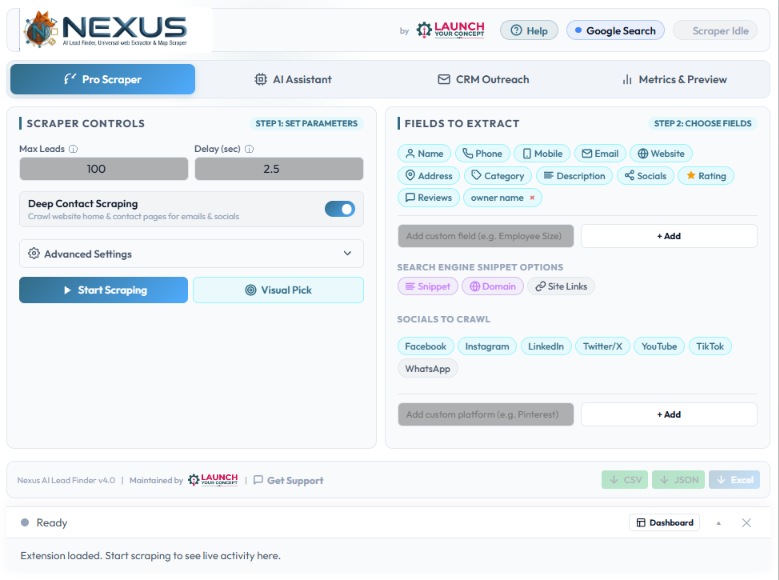
- Open the Toolbar Panel: Click the Nexus icon in your extension toolbar. Set your Max Leads to 20, set your Click Delay to 2.5 seconds, and check the box for Deep Contact Scraping.
- Hit Start Scraping: Click the primary action button. Watch as Nexus takes control of the page, automatically scrolling the feed, opening listing cards, extracting contact details, and updating the live HUD banner at the bottom of your screen! When finished, click Open Workspace Dashboard to view and export your spreadsheet.
Here are some screenshots of the Extension


XI. The Vision Behind Launch Your Concept

Nexus was not built as a quick hobby project; it is the culmination of years of engineering expertise developed by Launch Your Concept (LYC).
We are a premier software engineering and digital product agency specializing in custom SaaS development, high-performance mobile applications, Minimum Viable Products (MVPs), autonomous web scraper bots, and enterprise automation systems. Our core philosophy is simple: we believe founders and businesses deserve enterprise-grade software without the enterprise price tag or predatory recurring SaaS billing.
When we looked at the landscape of sales intelligence tools, we saw an industry dominated by data cartels charging exorbitant monthly fees for recycled, inaccurate lead lists. We built Nexus to shift power back into the hands of individual founders, sales teams, and developers by providing a sovereign, local-first alternative.
Our Technical Expertise
At Launch Your Concept, we specialize in solving complex software challenges across modern tech ecosystems:
- Custom Web & Mobile Applications: Full-stack architecture utilizing MERN (MongoDB, Express, React, Node.js), Next.js, React Native CLI, Flutter, and Java Spring Boot.
- High-Scale Web Crawlers & Automation: Designing resilient, anti-detection data harvesting pipelines and automated workflow sequences that operate reliably at scale.
- AI & Machine Learning Alignment: Integrating on-device LLMs (like Google Gemini Nano), agentic AI workflows, and cloud inference models directly into production web software.
- Browser Extension Engineering: Building secure, Manifest V3-compliant extensions that supercharge browser productivity and automate complex manual web workflows.
Need a Custom Enterprise Solution?
If your business requires custom-engineered data crawlers, tailored browser extension builds, automated CRM pipelines, or a dedicated team to turn your software product concept into a market-ready reality, we are ready to build with you.
- 🌐 Visit our official website: https://www.launchyourconcept.com/
- 📞 Schedule a project design consultation & support: https://www.launchyourconcept.com/contact
- 🏢 Headquarters: Kolkata, West Bengal, India
Stop overpaying for bad data and bloated SaaS subscriptions. Take control of your sales pipeline, run your AI locally, and harvest the web on your own terms with Nexus.
Have thoughts or questions on this topic?
Follow and discuss with our engineering team on X / Twitter for daily tech breakdowns, system design notes, and software engineering debates.
Related Articles

Your Phone Was Always a Better Remote Control . NEXORA Just Made It Feel Like One
I never noticed how frequently I reached for the mouse until I began keeping count. Lean in, click, lean back, open a tab, skip a track, type six words—and repeat the loop dozens of times an hour. The

Beyond the Hype: Building AI Agents That Actually Work in Production
We’ve all seen the magical AI demos. You type a vague prompt into a chat box, and a few seconds later, an "autonomous agent" writes a marketing plan, codes a website, and emails a client. It looks
Out of a quiet obsession, we built a beast. 60+ heavy utilities, handed freely to the web.
A few months ago, Launch Your Concept released a beast. 60+ massive utilities operating entirely off the grid.. Inside the engineering madness that built FlashTools. We were tired of the web feeling